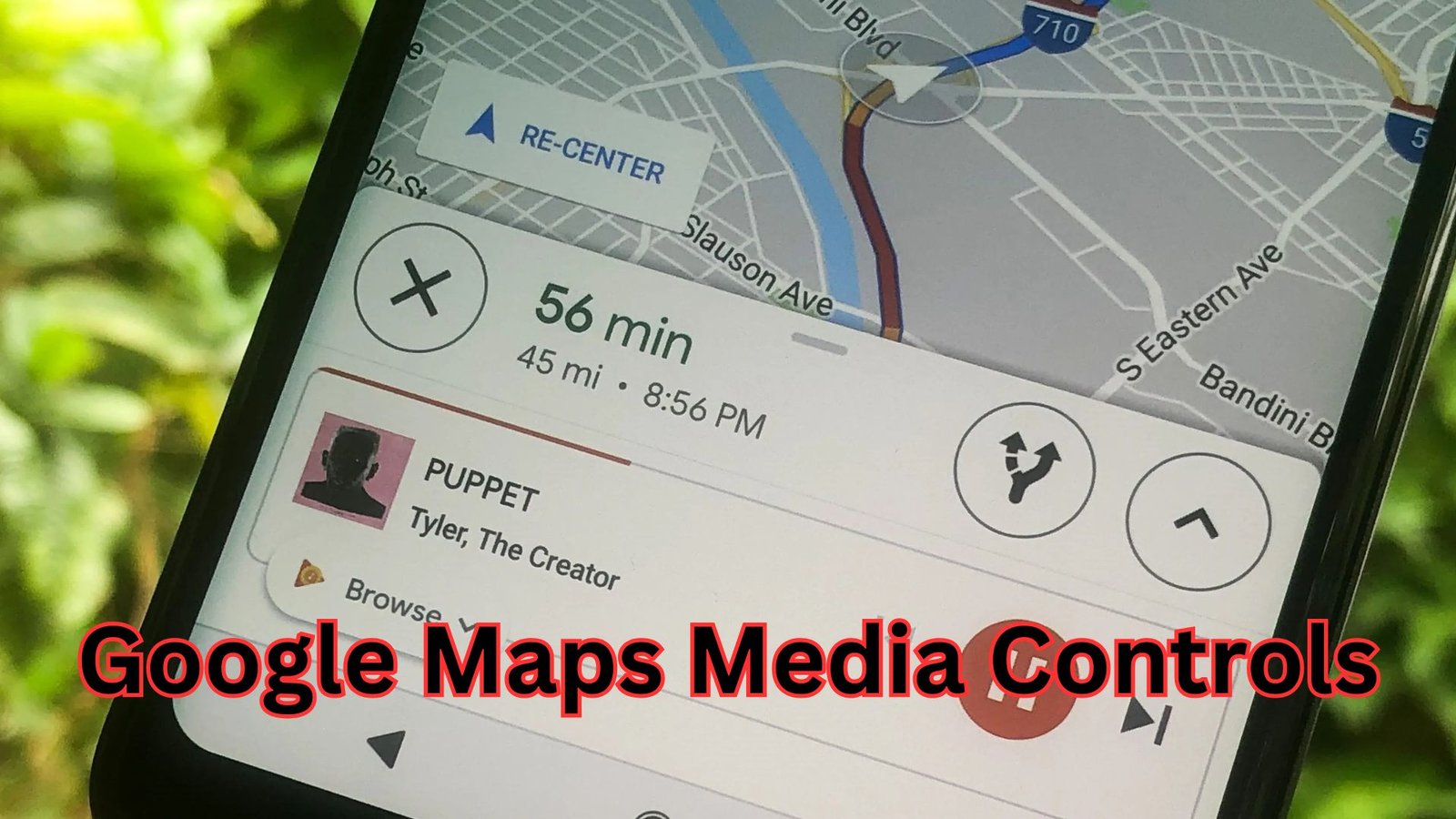
Google Maps media controls have quietly become one of the most helpful features for modern drivers, blending navigation and entertainment into a smoother, safer experience. Instead of switching between apps while driving, users can now manage music, podcasts, and audiobooks directly from the navigation screen, reducing distraction and keeping focus where it belongs. This subtle but meaningful upgrade has changed how people interact with maps during daily commutes and long road trips alike.
As smartphones have replaced standalone GPS devices, expectations for convenience have grown. Navigation is no longer just about directions; it is about creating a connected driving environment. Media playback integration fits naturally into that vision, allowing drivers to stay informed, entertained, and relaxed without breaking their driving rhythm.
Table of Contents
How in-app media playback became part of navigation apps
Navigation tools were once simple turn-by-turn systems. Over time, they evolved to include traffic updates, lane guidance, voice commands, and real-time rerouting. Entertainment, however, lived in a separate space. Drivers had to switch apps or rely on car stereos, which often meant taking eyes off the road.
As mobile operating systems matured, developers began exploring ways to reduce app switching. Audio was the logical first step because it already works hands-free. By integrating playback management directly into the navigation interface, mapping apps could offer a safer, more cohesive experience. This shift aligned with broader trends in automotive technology, where minimal interaction and voice-first control are increasingly prioritized.
What makes Google Maps media controls stand out
Google Maps media controls feel natural because they do not overwhelm the screen. They appear only when audio is playing and stay visually secondary to navigation instructions. This balance is important. Directions remain the priority, while playback options stay easily accessible.
Another strength is compatibility. The feature works with popular music and podcast platforms, allowing users to continue listening to their preferred content without switching ecosystems. The controls adapt well whether you are driving in a car, riding a motorcycle with a mounted phone, or navigating on public transport.
Responsiveness also plays a role. Playback actions register quickly, and the interface remains smooth even during reroutes or heavy traffic visualization. This consistency builds trust, especially when drivers rely on audio cues and quick glances rather than full interaction.
Google Maps media controls and supported audio platforms
One reason this feature gained traction is its broad support for third-party audio services. Users are not limited to a single provider, which keeps the experience flexible. Music streaming, podcast listening, and spoken-word content all integrate seamlessly.
Once connected, the navigation screen displays playback buttons that allow pausing, skipping, or resuming content. The layout stays familiar, reducing the learning curve. Drivers who already know their audio apps can use the controls instinctively without relearning new gestures.
This openness also benefits content creators and streaming platforms. Their audio remains accessible in a high-use environment without requiring users to open separate apps mid-drive.

Safety and reduced distraction while driving
Safety is the strongest argument in favor of integrated media management. Every time a driver switches apps, cognitive load increases. Even a second of distraction can matter at highway speeds. By keeping playback actions within the navigation interface, the need for multitasking drops significantly.
Voice guidance works alongside audio playback, automatically lowering volume when directions are spoken. This intelligent audio balance ensures instructions are never missed while still maintaining listening continuity. Over time, drivers adapt to this rhythm, making the experience feel seamless rather than intrusive.
From a design perspective, simplicity is key. The interface avoids unnecessary animations or clutter, which aligns with best practices in automotive user experience design.
Customization options and user control
Users can adjust how media features behave within the app settings. Preferences include selecting a default audio service, choosing whether playback resumes automatically, and managing notification behavior. These options help tailor the experience to individual habits.
For frequent commuters, consistency matters. Once preferences are set, the system behaves predictably, which reduces mental effort during daily drives. For occasional users, the default settings are intuitive enough to require minimal adjustment.
This balance between customization and simplicity makes the feature accessible to a wide range of users, from tech-savvy drivers to those who prefer minimal configuration.
Google Maps media controls in Android Auto and car dashboards
Google Maps media controls become even more powerful when paired with Android Auto or compatible car infotainment systems. On larger dashboard screens, the controls are clearer and easier to interact with, further reducing distraction.
Physical buttons on steering wheels often map directly to playback actions, creating a hybrid experience that combines touch, voice, and tactile input. This integration feels natural because it mirrors how drivers already interact with in-car audio systems.
As more vehicles adopt smart dashboards, this type of integration is likely to become the standard rather than the exception.
Comparison with other navigation apps
Other navigation platforms offer similar features, but implementation quality varies. Some apps prioritize media too heavily, cluttering the screen. Others hide playback controls behind menus, defeating the purpose of quick access.
Google Maps media controls strike a middle ground. They remain present without being intrusive and disappear when not needed. This restraint reflects a mature design philosophy focused on usability rather than novelty.
The consistency across devices and operating systems also gives it an edge, especially for users who switch phones or vehicles frequently.

Battery usage and performance considerations
Any added feature raises concerns about battery drain and performance. In practice, integrated playback management has minimal impact. Audio streaming itself consumes most of the power, while the controls simply manage existing playback rather than adding heavy processing tasks.
The app remains responsive even on mid-range devices, which is important for users who rely on navigation for long periods. Efficient resource management ensures that convenience does not come at the cost of reliability.
Privacy and data handling
Media integration requires certain permissions, such as access to audio playback status. These permissions are limited in scope and focused on functionality rather than content analysis. Users retain control over connected services and can disconnect them at any time.
Transparency in permission requests builds trust, especially as users become more aware of data usage and privacy implications.
Future potential of integrated media experiences
As vehicles become more connected, the line between navigation and infotainment will continue to blur. Media recommendations based on trip length, traffic conditions, or driving patterns could become common. Spoken summaries, contextual audio cues, and adaptive playlists are all possibilities.
Google Maps media controls lay the groundwork for these advancements by establishing a stable, user-friendly interface that can evolve without disrupting existing habits.
Conclusion
Google Maps media controls may seem like a small feature, but their impact on everyday driving is significant. By combining navigation and audio management into a single, intuitive interface, the app reduces distraction, improves safety, and enhances overall comfort on the road. The thoughtful design, broad compatibility, and seamless performance make this feature a genuinely positive upgrade rather than a gimmick.
Also Read: Are Forever Stamps Still Good: The Powerful Truth That Brings Peace of Mind